ESP32 deep sleep: how to run a sensor on a battery for months
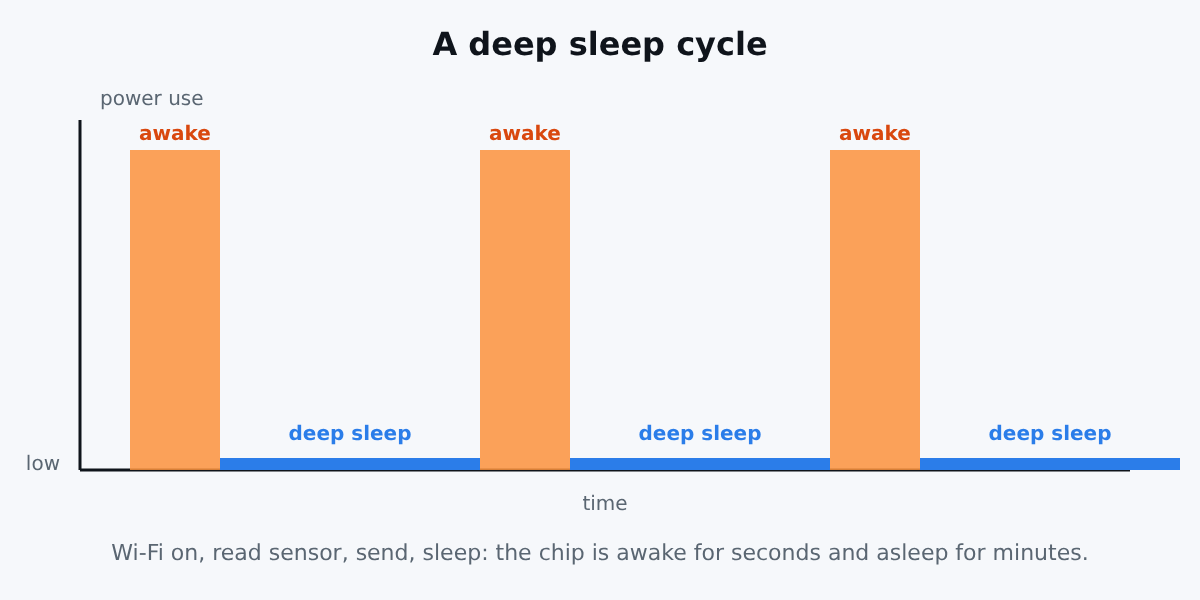
An ESP32 that stays awake all day with Wi-Fi on is a power hog. It will empty a small battery in days. The trick for battery projects is simple: sleep almost all the time, wake up, measure, send the value, and go back to sleep.
This is what deep sleep is for. This guide shows how it works, and gives two working examples: Arduino and ESPHome.
What deep sleep does
In deep sleep, the CPU, most of the RAM and the digital peripherals are powered off. Espressif's documentation says that only the RTC controller, the RTC peripherals and the RTC memories can stay powered (ESP-IDF sleep modes). Wi-Fi and Bluetooth are powered down as well, and connections are not maintained.
So a deep sleep wake-up is like a fresh boot: setup() runs again from the start. Variables are lost, unless you store them in RTC memory.
Ways to wake up
The chip wakes up when any enabled source triggers. The main sources on the ESP32 are:
- Timer: wake up after a set time. The most common choice.
- External pins (ext0, ext1): wake up on a button press or a door sensor.
- Touch pads: wake up on touch.
- ULP coprocessor: a tiny processor that can watch sensors while the rest sleeps.
The list and the supported chips are in the ESP-IDF sleep modes documentation. Wake-up sources vary between the ESP32 and ESP32-S3, so check the page for your chip.
Arduino example: wake up every minute
#include <Arduino.h>

// Survives deep sleep: stored in RTC memory
RTC_DATA_ATTR int bootCount = 0;

const uint64_t SLEEP_SECONDS = 60;

void setup() {
  Serial.begin(115200);
  delay(200);

  bootCount++;
  Serial.printf("Wake-up number %d\n", bootCount);

  // 1. Read your sensor here
  // 2. Connect to Wi-Fi and send the value here

  esp_sleep_enable_timer_wakeup(SLEEP_SECONDS * 1000000ULL);
  Serial.println("Going to sleep");
  Serial.flush();
  esp_deep_sleep_start();
}

void loop() {
  // never reached: the board restarts after each sleep
}
Key points:
RTC_DATA_ATTRkeeps a variable across sleeps.esp_sleep_enable_timer_wakeup()takes microseconds, hence the multiplication.Serial.flush()makes sure the last message is sent before the chip stops.- Do your work in
setup(), sinceloop()never runs.
ESPHome example
ESPHome has a deep_sleep component. This config wakes up every 10 minutes, stays awake for 30 seconds so that Wi-Fi connects and the sensor values are sent, and then sleeps again:
deep_sleep:
  run_duration: 30s
  sleep_duration: 10min

sensor:
  - platform: dht
    pin: GPIO4
    model: DHT22
    update_interval: 15s
    temperature:
      name: "Garage temperature"
    humidity:
      name: "Garage humidity"
run_duration and sleep_duration are described in the ESPHome deep sleep documentation. Add this to the usual Wi-Fi, API and OTA blocks from our DHT22 tutorial. While the board sleeps, it cannot receive anything, and Home Assistant shows its entities as unavailable until the next wake-up. That is normal.
A practical warning: with a very short run_duration there is almost no time to send a firmware update over Wi-Fi. Keep a way to stop the sleeping, such as a switch or a long first run, when you develop.
Mistakes that drain your battery
- Development boards waste power. The USB-to-serial chip, the power LED and the voltage regulator keep drawing current even when the ESP32 chip sleeps. The figure in the chip datasheet is not what a DevKit achieves. For real battery life, use a low-quiescent regulator and a board designed for it.
- Staying awake too long. Connecting to Wi-Fi takes seconds. Use a fixed IP and keep the awake time short. Shorter awake time means more battery.
- Sensors that stay powered. Power the sensor from a GPIO, or choose one with a sleep mode.
- Floating pins and pull-ups that leak current.
- Wrong battery for the job. A weak battery sags during the Wi-Fi transmit peak and causes brownouts.
How long will it last?
It depends on your board, your battery, how long you stay awake and how often you wake up. Measure it: put a multimeter or a power profiler in series with the battery, and measure the awake and sleeping currents. Then the maths is: average current = (awake current x awake time + sleep current x sleep time) / cycle time, and battery life = capacity / average current.
Which board?
For a first test the ESP32 DevKit is perfect, it is what we use in our other tutorials. For a final battery product, look for a board that was designed for low power.
Conclusion
Deep sleep turns the ESP32 from a power hog into a sensor that can run on a battery for a long time. Keep the awake time short, store what you need in RTC memory, and measure your real consumption. For a no-code approach, ESPHome gives you the same result in four lines.
The Arduino sketch was not compiled here; the ESPHome configuration was validated with esphome config. Measure your own setup before promising battery life to anyone.