ESPHome Bluetooth proxy: extend Home Assistant's Bluetooth range with an ESP32
Home Assistant can read Bluetooth sensors, but its Bluetooth radio is usually in a cupboard, far from the sensors. The signal is weak, and devices drop out. The fix costs a few euros: an ESP32 running the ESPHome Bluetooth proxy, placed where the devices are.
What a Bluetooth proxy does
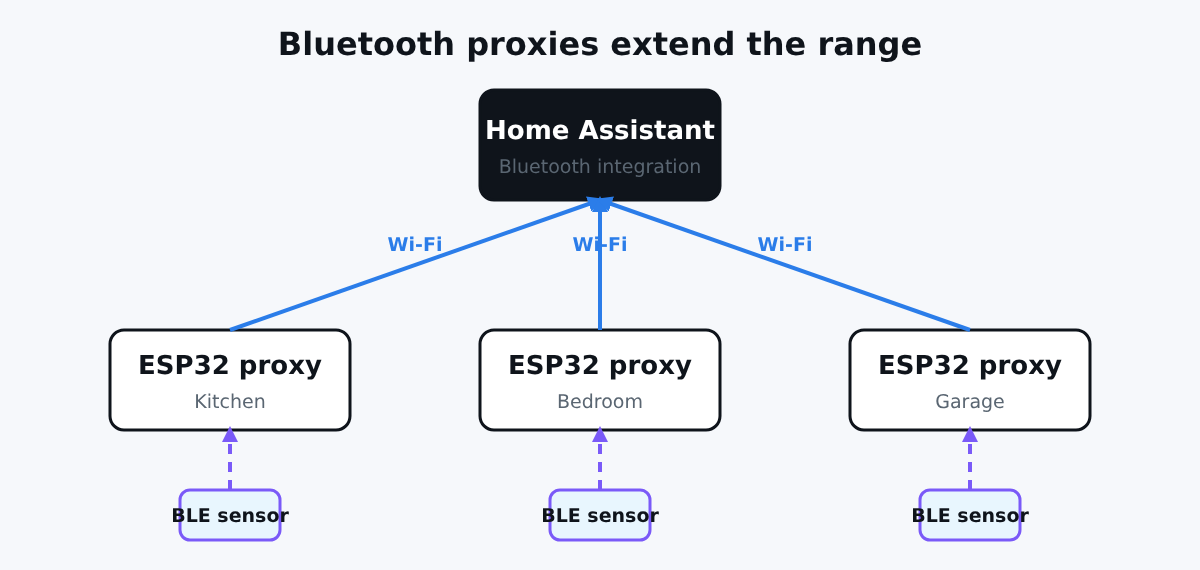
Home Assistant receives Bluetooth signals through an adapter attached to its host, or through a Bluetooth proxy on your network. Home Assistant's Bluetooth documentation recommends proxies over a directly connected adapter, because you can place the proxy close to the devices. When Home Assistant connects to a device, it automatically picks the proxy with the best signal.
The ESP32 listens to Bluetooth Low Energy broadcasts, and forwards them to Home Assistant over Wi-Fi. Home Assistant's Bluetooth integration combines all the proxies and any USB adapters. Device integrations (thermometers, plant sensors, BTHome devices) then work as if the radio was local (ESPHome Bluetooth proxy documentation). Only BLE devices are supported.
What you need
- An ESP32 DevKit per area: the ESP32 DevKit is enough. Buying the 3-pack makes sense if you want to cover several rooms. For more headroom, take the ESP32-S3 N16R8.
- A USB power supply near where you want coverage.
- Home Assistant with the ESPHome integration.
The configuration
esphome:
  name: bt-proxy-kitchen

esp32:
  board: esp32dev

wifi:
  ssid: !secret wifi_ssid
  password: !secret wifi_password

logger:

api:
  encryption:
    key: !secret api_key

ota:
  - platform: esphome
    password: !secret ota_password

esp32_ble_tracker:
  scan_parameters:
    interval: 1100ms
    window: 1100ms
    active: true

bluetooth_proxy:
  active: true
What the important lines do:
esp32_ble_trackeris required, because the proxy depends on it.intervalequal towindowmakes the ESP32 scan almost continuously, so it misses fewer broadcasts.bluetooth_proxy: active: truealso lets Home Assistant open connections to devices through this ESP32. Without it, the proxy only forwards broadcasts (the default isfalse).
The ESPHome documentation notes that active connections are limited in number: three at the same time, and devices that keep a connection open use one permanently. Plan more proxies if you use many connected devices.
Flash and add to Home Assistant
Use the ESPHome device builder as in our Mijia tutorial: add the file, click Install, and plug the board in for the first flash. Home Assistant will discover the device. Accept it with your API key. For a ready-made option, ESPHome also publishes a Bluetooth proxy installer that you can flash from your browser.
After that, Bluetooth devices around the proxy are discovered in Settings, Devices and services.
Where to put the proxy
- Near the devices, not near the router.
- Away from metal and big appliances.
- One per area: kitchen, bedroom, garage. Bluetooth does not go through walls well.
- Put it on a stable power source; a USB charger is perfect.
- Do not run too many other features on the same board; the Bluetooth stack uses a lot of RAM and shares the radio with Wi-Fi.
Proxy or presence sensor?
They use the same ESP32 and the same radio, but they do different things. A proxy gives Home Assistant access to Bluetooth devices. A presence sensor tells you if a tag or a phone is near. For the second, read our Bluetooth presence detector tutorial. If you only want one thermometer read, the Xiaomi Mijia guide reads it directly in ESPHome.
Conclusion
A Bluetooth proxy is the cheapest way to fix flaky Bluetooth in Home Assistant, and you can add more as your home grows. Flash one board, test it with a sensor, then add another where the signal is weak.
The configuration was validated with esphome config; it has not been tested with your devices.