ESPHome tutorial: connect an ESP32 to a Bluetooth device (BLE client)
Not every Bluetooth gadget broadcasts its data like a Xiaomi thermometer. Many of them stay silent until something connects to them: a heart-rate belt, a smart lock, a lamp, a battery pack. The ESP32 can be that something, and ESPHome makes it a short YAML file.
This tutorial connects an ESP32 to any Bluetooth Low Energy (BLE) device and reads its battery level. Once that works, you know how to read anything else.
What you need
- An ESP32 DevKit: ESP32 DevKit, or the ESP32-S3 N16R8 if you plan several connections.
- A BLE device that exposes the standard battery service (many do).
- A phone with a BLE scanner app such as nRF Connect, to explore the device.
Listening or connecting?
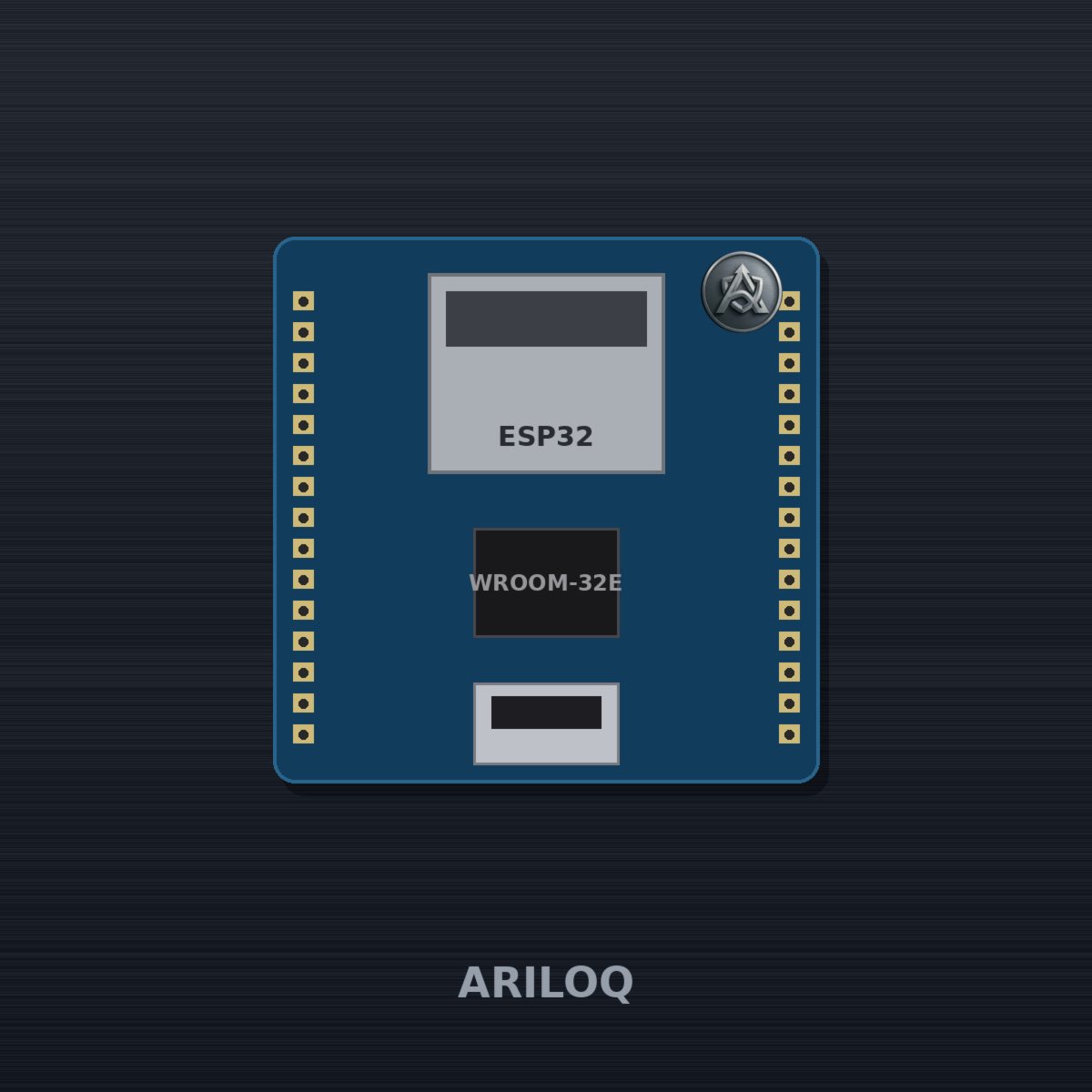
- Listening (
esp32_ble_tracker): the device shouts its data (adverts), the ESP32 just hears it. No pairing, no battery cost. This is how the Mijia thermometer works. - Connecting (
ble_client): the ESP32 opens a link and asks for values, called characteristics. Needed when the device only answers on request.
Rule of thumb: try listening first. Connect only when you must.
Step 1: explore the device
Open nRF Connect on your phone, scan, and connect to your device. You will see services and characteristics, each with a UUID. The standard ones are short:
| What | Service | Characteristic |
|---|---|---|
| Battery level | 180F |
2A19 |
| Heart rate | 180D |
2A37 |
Note the device's MAC address too. Some devices accept only one connection at a time, so disconnect your phone before using the ESP32.
Step 2: the configuration
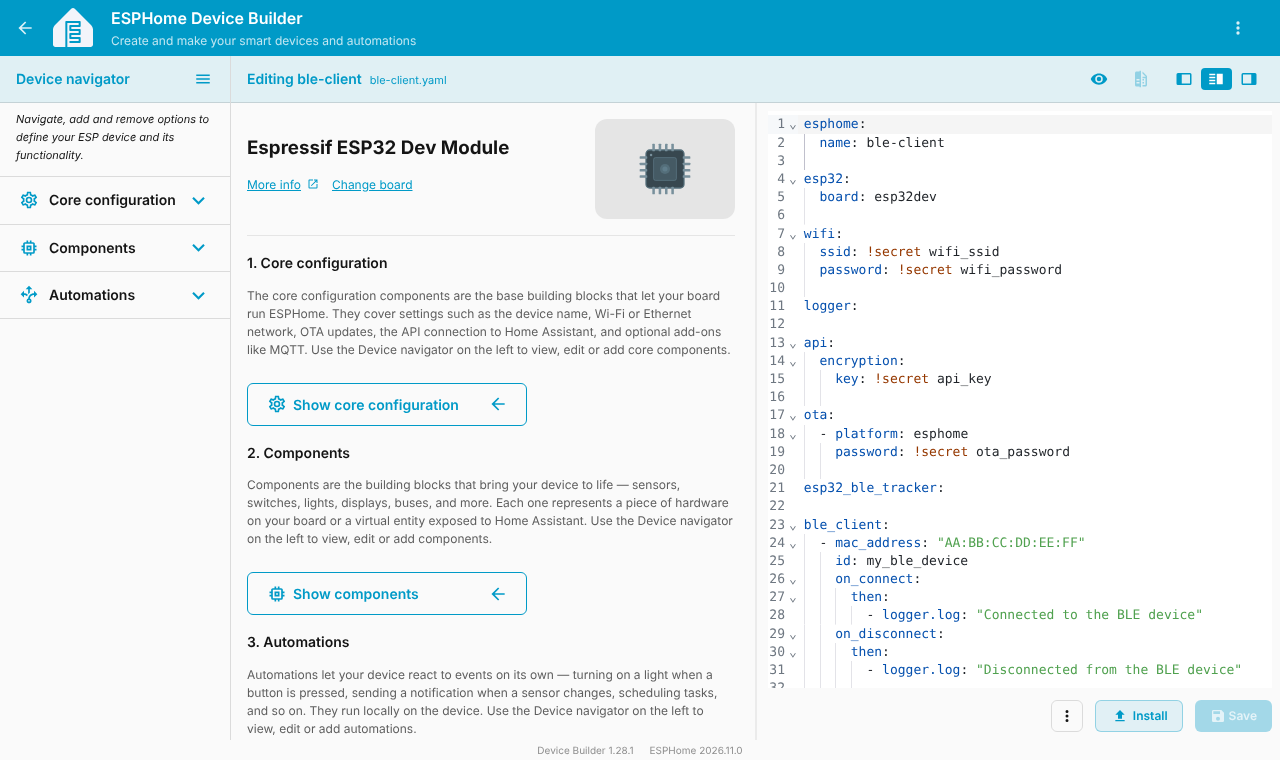
esphome:
  name: ble-client

esp32:
  board: esp32dev

wifi:
  ssid: !secret wifi_ssid
  password: !secret wifi_password

logger:

api:
  encryption:
    key: !secret api_key

ota:
  - platform: esphome
    password: !secret ota_password

esp32_ble_tracker:

ble_client:
  - mac_address: "AA:BB:CC:DD:EE:FF"
    id: my_ble_device
    on_connect:
      then:
        - logger.log: "Connected to the BLE device"
    on_disconnect:
      then:
        - logger.log: "Disconnected from the BLE device"

sensor:
  - platform: ble_client
    type: characteristic
    ble_client_id: my_ble_device
    name: "BLE device battery"
    service_uuid: "180F"
    characteristic_uuid: "2A19"
    notify: true
    update_interval: 60s
    unit_of_measurement: "%"
    device_class: battery
How it works:
esp32_ble_tracker:is always required, even for a client.ble_clientdeclares the device by MAC address and gives it anid.on_connectandon_disconnectrun actions. Here they just write to the log, but you could switch a relay.- The
ble_clientsensor reads one characteristic.notify: trueasks the device to push changes, andupdate_intervalrefreshes the value too.
Step 3: flash and watch the logs
docker run --rm -p 6052:6052 -v "$PWD/config":/config esphome/esphomeInstall, then open the logs. You should see the connection message, then the battery value.
Troubleshooting
- It never connects: the device may be out of range, already connected to your phone, or asking for pairing.
- The sensor stays empty: check the UUIDs in nRF Connect. Some devices use 128-bit custom UUIDs.
- Everything gets slow: a BLE connection uses RAM and radio time. Keep the number of connected devices low, and share the radio with Wi-Fi sensibly. The ESP32-S3 with more memory helps.
- Pairing needed: some devices require bonding, which is outside this simple setup.
Conclusion
You now know the two Bluetooth modes of ESPHome. Reading a battery is the "hello world": the same pattern reads other characteristics. To know who is home, continue with the BLE presence detector.
This configuration was validated with esphome config, not tested on your device. Characteristics vary from device to device.