ESP32-S3 N16R8 explained: 16 MB flash, 8 MB PSRAM and the pins you lose
If you shop for an ESP32-S3 board, you will meet names like N8, N16R2 or N16R8. They look like a secret code, but they are simple once you know the rule. This guide explains what N16R8 means, what you gain, what you give up, and how to set it up properly.
What N16R8 means
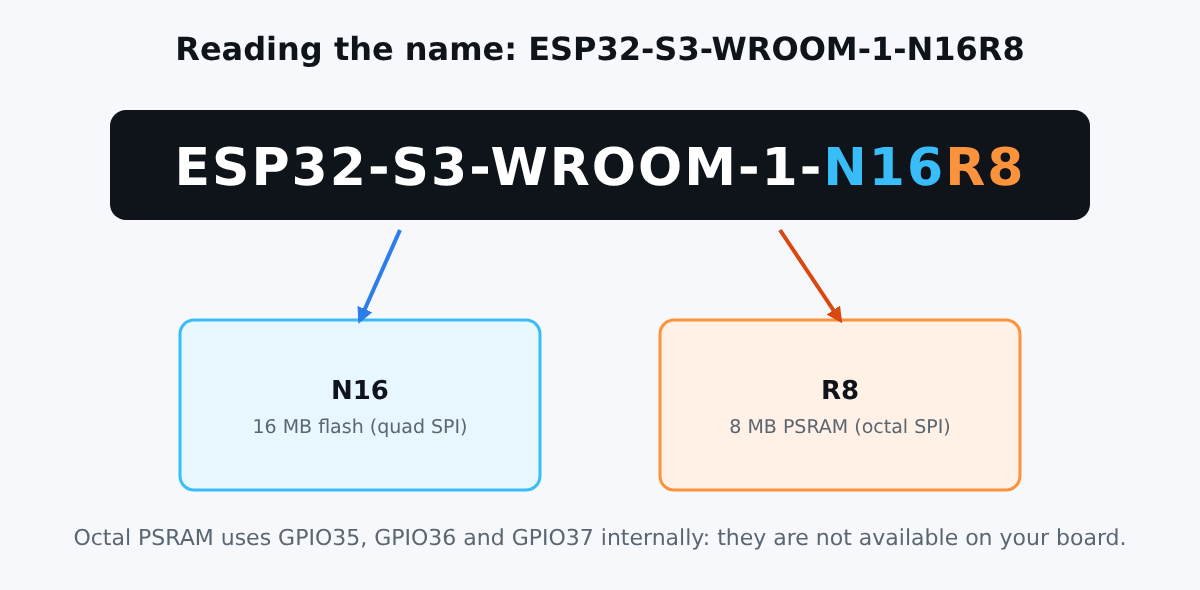
On Espressif's ESP32-S3-WROOM-1 module, the end of the name tells you the memory. In Espressif's own terminology, the letters stand for flash and PSRAM, and the numbers give their size (Espressif flash and PSRAM guide).
- N16: 16 MB of flash, where your program and files are stored.
- R8: 8 MB of PSRAM, extra working memory on top of the chip's internal RAM.
On the N16R8 module, the flash uses a quad SPI interface and the PSRAM uses an octal SPI interface, according to the ESP32-S3-WROOM-1 datasheet. Octal means eight data lines, so it is faster than the quad PSRAM found on R2 variants.
Flash and PSRAM: what is the difference?
| Flash | PSRAM | |
|---|---|---|
| Role | Stores your firmware, web pages, fonts, files | Extra RAM for buffers and data at runtime |
| Survives power off | Yes | No |
| Typical use | Big programs, OTA updates, file systems | Camera frames, display buffers, audio, large JSON, AI models |
| N16R8 size | 16 MB | 8 MB |
Most simple projects (a sensor that sends a value every minute) never need 8 MB of PSRAM. The ESP32 DevKit is enough for them. PSRAM matters when you handle big chunks of data.
When the N16R8 is the right choice
- Cameras and displays: a frame buffer or a colour screen can eat megabytes.
- Audio and voice: recording, playing and processing sound.
- Machine learning at the edge: models and tensors need room.
- Big web interfaces or JSON documents: parsing large payloads without running out of memory.
- Many features at once in ESPHome, such as Wi-Fi, Bluetooth and a display on the same board.
- OTA updates with room to grow: 16 MB of flash leaves space for large firmware images.
If your project is a thermometer, a relay or a presence sensor, the standard board is the cheaper and simpler pick. If you want room to grow, the ESP32-S3 N16R8 DevKit is the one.
The catch: GPIO35, GPIO36 and GPIO37
Octal PSRAM talks to the chip over extra pins. Espressif's development kit documentation states that on boards with octal SPI flash or PSRAM, GPIO35, GPIO36 and GPIO37 are used for the internal communication and are not available to you (ESP32-S3 dev kits documentation). The hardware design guidelines go further for octal flash and PSRAM in general: GPIO33 to GPIO37 are occupied (hardware design guidelines).
In practice: do not wire anything to GPIO35, 36 or 37 on an N16R8 board. Use the other pins, and see our GPIO pinout guide.
Temperature range
The datasheet lists the R8 modules for an ambient temperature range of -40 to 65 degrees Celsius. Enabling the PSRAM ECC feature raises the maximum to 85 degrees, at the cost of 1/16 of the PSRAM capacity. For a living room or a garage this is no issue. For a sensor in direct summer sun or inside a hot enclosure, keep it in mind.
Arduino IDE settings
After installing the ESP32 board package, select ESP32S3 Dev Module and set these options in the Tools menu:
- Flash Size: 16MB.
- PSRAM: OPI PSRAM (octal).
- USB CDC On Boot: enabled if you want
Serialover the native USB port.
If PSRAM is left disabled, the board works, but your sketch cannot use the 8 MB. Wrong flash or PSRAM settings are a common cause of boot loops, so check them first when a sketch crashes at start.
ESPHome settings
esp32:
  board: esp32-s3-devkitc-1
  flash_size: 16MB
  framework:
    type: esp-idf

psram:
  mode: octal
  speed: 80MHz
The psram component enables the memory so that features like displays and cameras can use it. See the ESPHome PSRAM documentation for details. If you plan Bluetooth projects, our ESPHome Bluetooth proxy guide shows a good use for the extra headroom.
Quick buying checklist
- Do you need PSRAM? If not, a standard ESP32 saves money.
- Do you need native USB or AI features? Choose an ESP32-S3.
- Will you use camera, display or audio? Choose N16R8.
- Do you need pins 35, 36 or 37? Then pick a variant without octal PSRAM.
- Is it hot where the board will live? Check the temperature range.
Conclusion
N16R8 simply means 16 MB of flash and 8 MB of octal PSRAM. It is a great board for demanding projects, as long as you leave GPIO35 to 37 alone and select the right options in your tools. Do you want to compare it with the classic ESP32? Read ESP32 vs ESP32-S3.
Sources
- Espressif: SPI flash and external SPI RAM configuration
- Espressif: ESP32-S3-WROOM-1 and WROOM-1U datasheet
- Espressif: ESP32-S3 hardware design guidelines, schematic checklist
- Espressif: ESP32-S3 development kits
- ESPHome: PSRAM component
- Omar Ghader, ESP32 smart home projects with ESPHome and Home Assistant